

Search has shifted into a mode where answers appear before links. AI Overviews now sit at the top of many results, summarizing information before users scroll. That shift affects clicks far more than most teams realize. It isn’t simply a traffic drop; it’s a reordering of visibility, query behaviour, and brand impressions.
Marketing leaders can’t rely on traditional SEO dashboards anymore. You need query-type segmentation, entity-based tracking, and UX responses that match the way users consume AI-generated answers. The teams winning right now are measuring suppression at the query level and adjusting content formats fast enough to earn space in these new summaries.
Your advantage comes from spotting patterns early, specifically how AI Overviews interact with informational and commercial intent, where CTR loss is steepest, and which dashboards help you track those shifts every week.
Key Takeaways:
- AI Overviews reduce clicks most aggressively on informational queries, so monitoring intent-based segments is now mandatory.
- Commercial queries still send traffic, although the scroll depth changes, so brand presence in the Overview matters even if your link doesn’t rank first.
- Your response starts with entity optimization and page UX that supports fast answers, structured clarity, and review-driven credibility.
Contents
How AIOs Change User Behaviour
AI Overviews aren’t designed to replace search engines, yet they compress several decision steps that once happened across multiple clicks. Instead of users comparing several blue links, they now skim a packaged explanation that reduces the need to explore. That creates two behavioural shifts.
- Users scan before they click.
Scrolling behaviour changed. People skim the AI Overview and then decide whether they need more detail. This cuts early-page CTR across countless industries. Even high-ranking results may sit below the fold, so the old belief that “ranking equals traffic” doesn’t apply consistently anymore. - Brand weight matters earlier.
When an AI Overview references a brand, visually or textually, users file that away before reaching your website. Your brand either enters the consideration set early or disappears before the decision even starts. That moves entity optimization from “nice SEO hygiene” to a front-line requirement.
CTR suppression becomes predictable when you divide queries by intent.
Informational queries experience the most severe drop because users feel they have received the answer already. Commercial queries depend more on reassurance, trust signals, and comparison, which gives your pages room to earn engagement after the Overview.
This is why the smartest teams don’t ask, “Did traffic drop?” They ask, “Which query types lost engagement, and how is user behaviour shifting within each one?”
Queries Most at Risk (Informational vs. Commercial)
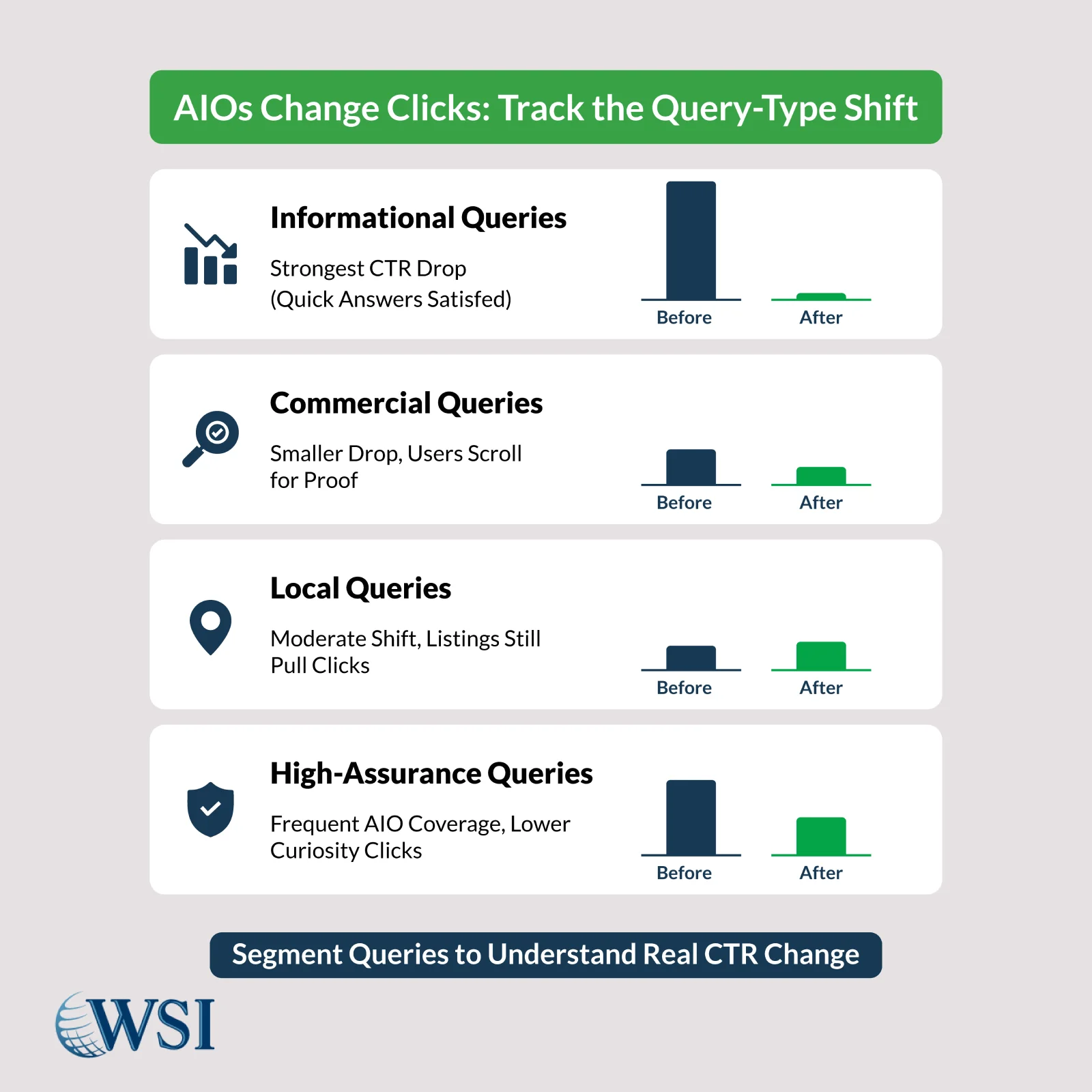
AI Overviews don’t treat all searches evenly. Your first step is dividing your query universe into segments that behave differently once summaries appear.
1. Informational Queries
This segment absorbs the largest CTR hit. People expect straightforward answers, so the Overview satisfies the intent quickly. Patterns you’ll notice:
- High impressions, low clicks, steady ranking
- Rising “zero-scroll” impressions in Search Console
- Stagnant engagement despite content refreshes
This doesn’t mean your content lost relevance. It means users interact differently when the answer appears upfront.
2. Commercial Queries
Commercial intent behaves differently because users still want reassurance. They want comparisons, credibility markers, pricing context, and authentic reviews, items that an AI Overview rarely provides fully.
Before/after patterns here show:
- Minor changes in CTR compared to informational queries
- Higher scroll depth than informational queries
- Growth in branded searches when your name appears in the Overview
Brands that appear inside these summaries gain trust early in the decision cycle. Brands that do not appear fall out of consideration, even if they rank organically.
3. Local & Near-Me Queries
Local intent sees moderate CTR shifts because maps and listings remain strong click magnets. The risk shows up when an AI Overview displays pros/cons of a local provider straight from third-party reviews. Teams must watch sentiment signals closely since summaries mirror what the ecosystem says, not what your site says.
4. High-Assurance Queries
Queries that rely on safety, compliance, sensitivity, or medical precision receive extensive AI Overviews. CTR drops occur when users feel the Overview provides enough baseline clarity to skip intermediate steps.
Segmenting these four query types gives you a reliable before/after picture without being distracted by global averages that hide real change.
5 Dashboard Views to Build This Week
Marketing leaders need dashboards that diagnose AI Overview exposure before revenue forecasts take a hit. Five views matter most right now.
1. SERP Feature Suppression View
Track impressions that include AI Overviews, combined with actual page placement. This shows where you appear relative to the Overview and how often your ranking position sits below the scroll threshold.
2. Query-Type CTR Comparison
Break CTR by informational, commercial, local, and high-assurance categories. AIO exposure rarely affects all intent groups equally, so this prevents misinterpretation.
3. Entity Presence Frequency
Monitor the number of times your brand appears in AI-generated summaries using third-party SERP monitoring tools. Treat it like share-of-voice for AI Overviews.
4. Before/After Scroll Depth
Scroll depth patterns reveal how users behave once the Overview appears. Even small changes predict big revenue effects, especially in commercial segments.
5. Conversion Recovery View
Some pages will retain conversion rates even with suppressed CTR. These pages often have dense credibility modules, answer-first formatting, and sharp UX. Track the pages that perform well despite AIO pressure so you can replicate those patterns across your site.
Marketing leaders using these dashboards spot problems before they show up in revenue lines. More importantly, they learn which parts of the funnel remain resilient.

Track your AIO exposure before traffic plateaus.
Get a weekly breakdown of which query types lose clicks and how your pages respond.
Pivot Actions (PR, Reviews, Schema, Answer-First Modules)
Responding to AIO exposure isn’t only about SEO tweaks. It’s about shaping signals that AI systems pull from the web.
1. PR and Mentions
AI Overviews rely heavily on entity relationships. If authoritative publications mention your brand, those signals influence how often your name appears in summaries. Modern PR becomes an input channel for visibility inside these answers.
2. Review Strength and Sentiment
AIOs reference reviews across multiple platforms. Your sentiment profile affects your appearance inside these summaries. Teams should:
- Consolidate review velocity
- Encourage high-context feedback (not generic praise)
- Correct outdated reviews on third-party sites
These reviews act as credibility anchors the system draws from.
3. Schema Expansion
Structured data helps machines interpret page purpose more clearly. The goal isn’t to chase microdata complexity but to reinforce entities, FAQs, product details, and authorship clarity.
4. Answer-First Page Modules
Pages that win post-AIO clicks place the primary answer at the top and layer context below. Users who scroll past the AI Overview want immediate confirmation, not long introductions.
Patterns that work include:
- Summary box with the main answer
- Clarifying bullets addressing the next three likely questions
- Trust modules (reviews, awards, brand signals) above the fold
This creates a “second-opinion” experience for users who scroll past the Overview seeking reassurance.
Reporting Cadence for Exec Buy-in
Leadership teams care about stability, predictability, and revenue reliability. AIOs disrupt all three, so reporting cadence becomes central to your strategy.
Here’s a cadence that keeps decision-makers aligned with search volatility.
Weekly
- Query-type CTR comparison
- SERP feature impressions
- Pages recovering clicks through UX changes
- Brand presence inside Overviews
Weekly reports catch sudden shifts early, especially when Google tests new formats.
Monthly
- Revenue influence from suppressed pages
- Entity presence patterns
- Sentiment and review trends
- PR mentions and authority signals
Monthly reporting connects visibility changes to business outcomes.
Quarterly
- Forecasting based on stabilized patterns
- Content updates by query tiers
- UX upgrades tied to conversion recovery
- Executive briefings anchored in visual dashboards
A consistent cadence builds confidence. Executives feel informed instead of surprised, and your team gains room to test new formats without anxiety.
AI Overviews Create Faster UX
AI Overviews are reshaping search in ways that demand sharper dashboards, faster UX adjustments, and an entity-driven visibility strategy. CTR loss isn’t random; it’s intent-specific and pattern-based. When you track the right segments, strengthen your signals, and create answer-first experiences, you preserve traffic where it counts and influence users long before they click.

Build dashboards that explain the AI Overview impact clearly to executives.
Identify suppression patterns, model revenue risk, and track entity presence.